Agent Builder
Opening
Here's an architecture I've always wanted to build: a virtual actor per tenant, with database isolation, swappable persistence, and real-time synchronization over WebSockets.
Building such an application often means stitching together stateless API servers, databases, WebSocket servers, pub/sub systems, and change-tracking infrastructure.
What if most of that coordination could happen in one place?
Imagine every tenant having its own small server responsible for handling mutations, subscriptions, and synchronizations across connected browsers.
Each tenant also gets its own database. That could be a local database running alongside the actor, or for tenants with geographical requirements, the same actor could communicate with a regional database instead.
The idea is to make real-time synchronization, tenant isolation, and horizontal scalability properties of the architecture itself, rather than features assembled from multiple independent infrastructure components.
That's what I designed and built for this multi-tenant AI chatbot builder.
[Use carousel for these images.]
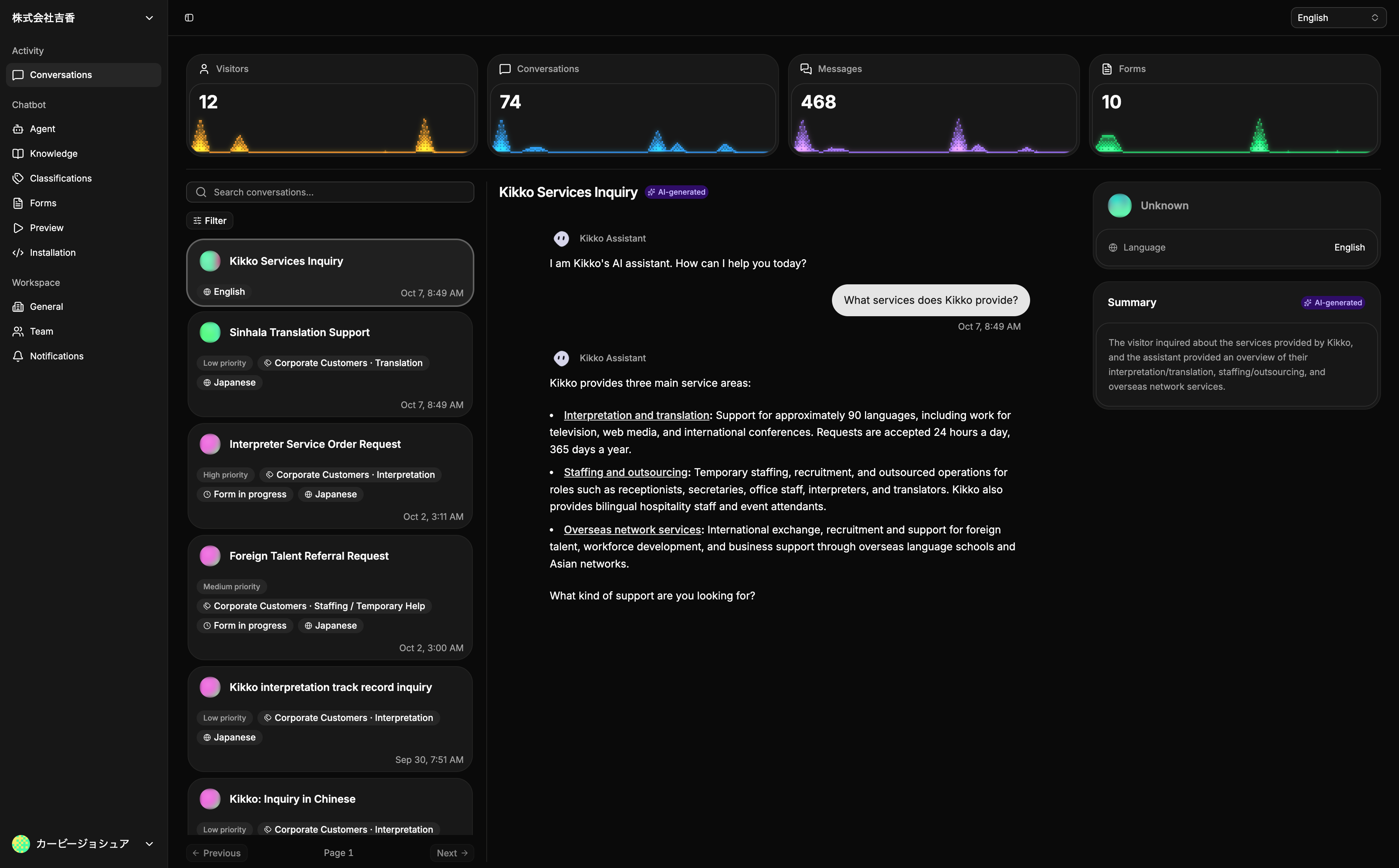
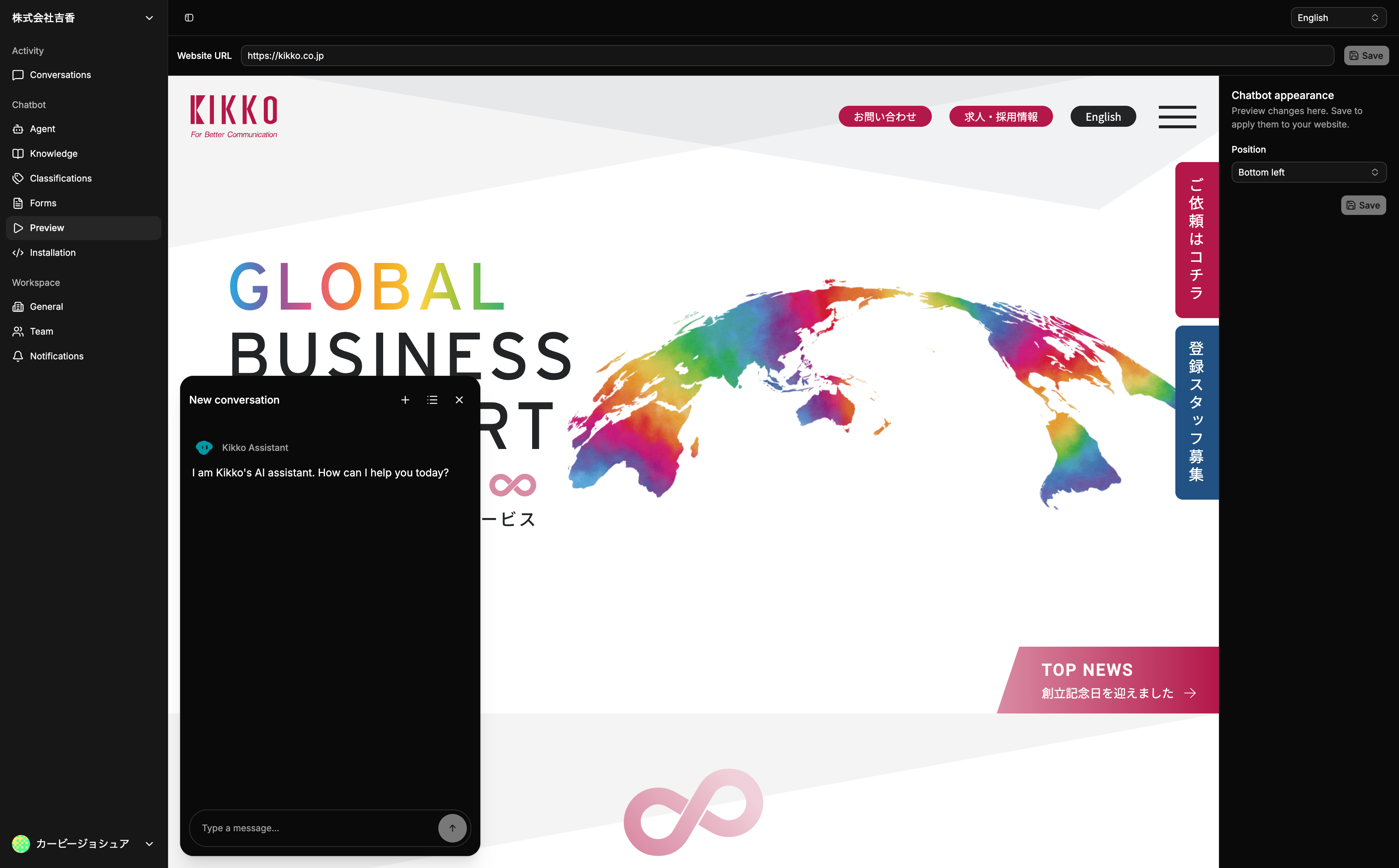
Tenant Database and Realtime Synchronization
One actor owns each tenant's database
I implemented the actors using Cloudflare Durable Objects (DOs), which are small serverless instances that share state acorss requests to the same object.
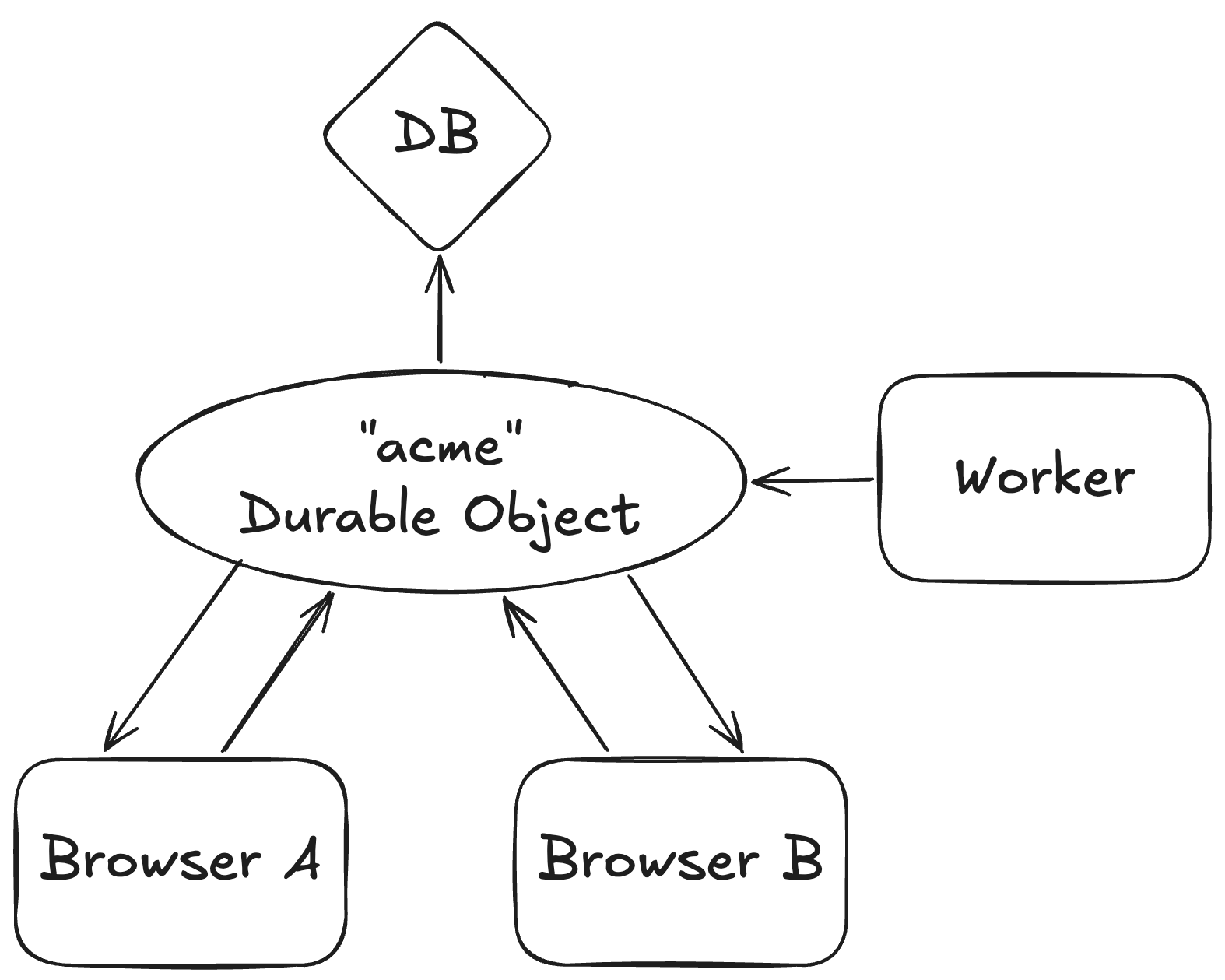
While individual Worker serverless functions handle most server requests, a single DO instance owns all database access for each tenant. Browsers connect to the DO over WebSocket, and Workers communicate over RPC to access the database. This design completely omits a shared database across tenants, ensuring all personal data are stored in the tenant's [selected region: I should introduce the fact that tenant's can select regions first; this is only introduced later. Or remove, or rewrite so it makes more sense.]. All mutations and subscriptions for a tenant meet in the same place, allowing the synchronization layer to notify connected browsers when the data they’re subscribed to changes.
One database interface across backends and runtimes
During sign-up, a tenant can select global or regional persistence. Global persistence uses the DO's embedded SQLite storage, whereas regional persistence uses a Turso SQLite storage in that region.
[We also have: This gets introduced a bit weird. Persistence gets introduced with a real need or context, but this is just "we have 2 of X too".] 2 server runtimes between Workers for HTTP requests and DO for WS and RPC database operations.
[To avoid: Maybe this should lead with a problem rather than avoidance of a potential problem?] leaking implementation details into feature code and/or coupling feature code to a specific implementation, we use Effect Services to define one shared interface, and supply the correct implementation using Effect Layers.
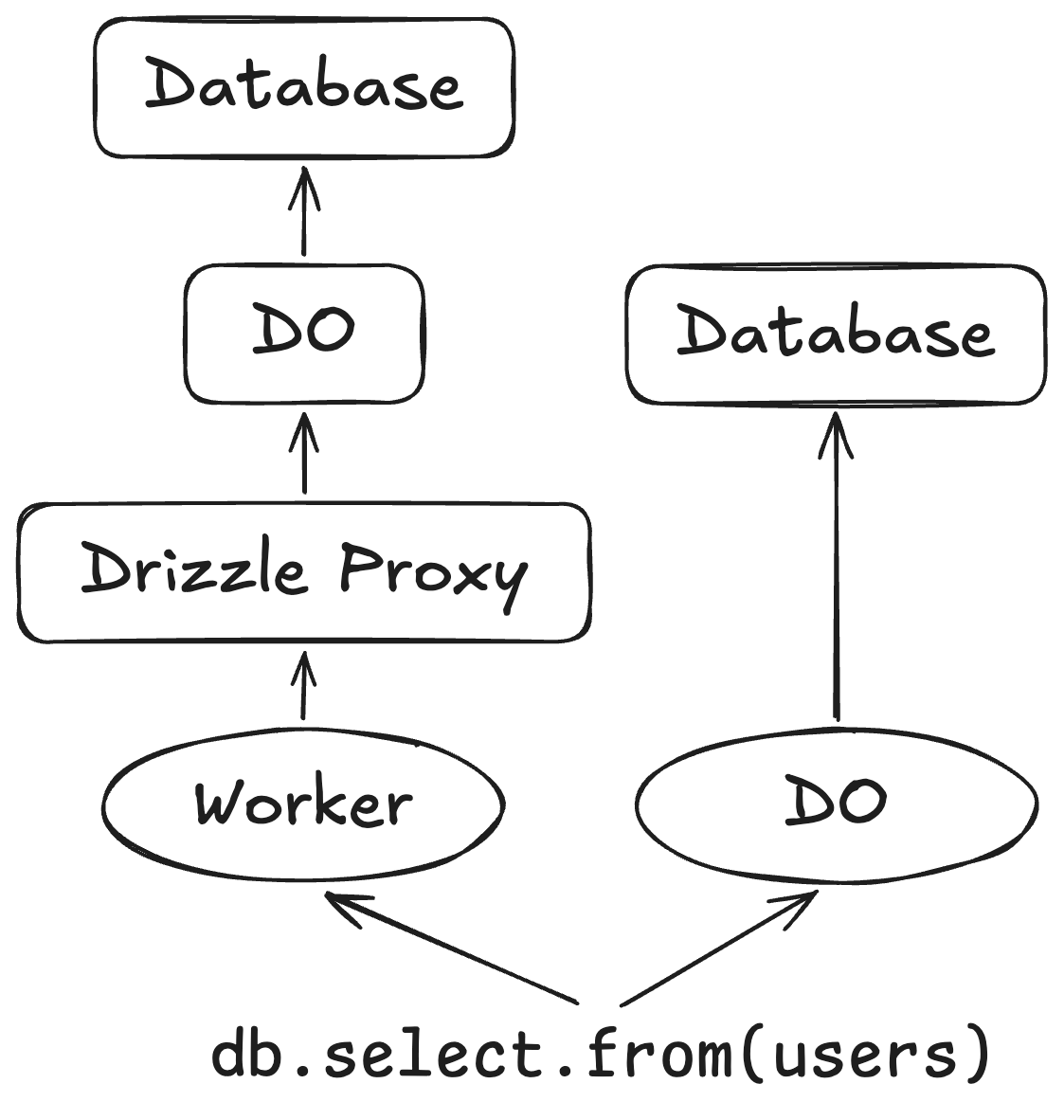
For persistence, this results in a sync layer that is ignorant of the database backend.
For database access, we write code once using Drizzle. The Worker Layer uses a Drizzle Proxy, which communicates with the DO over RPC, to finally execute the SQL statement on the DO. The DO Layer simply supplies a direct database access instead.
Despite the multitude of possible database backends and runtimes, feature code doesn't have to know where it will be executed and what database is used.
Subscriptions, mutations, and optimistic updates
I promised real-time syncrhonization over WebSockets, so here's how I implemented it.
Subscriptions
Browsers can subscribe to data over WebSockets and receive updates when changes occur through the DO.
First, the browser must connect to the DO over WebSockets. Then, the browser sends a message to the DO to subscribe to a named query. The DO authorizes the subscription request, stores the subscription, executes the read, and returns the result. The browser stores the result in a TanStack DB collection, which exposes the data to components while providing optimistic capabilities.
Queries are defined on the server instead of allowing the browser to write arbitrary SQL. The DO defines a named query using a custom API.
defineQuery({
	name: "CustomerThreads",
	input: Schema.Struct({ customerId: Customer.fields.id }),
	authorize: staff,
	read: (args) => {
		const customer = query({
			from: Customers,
			select: { name: Customers.name },
			where: eq(Customers.id, args.customerId),
		})

		const threads = query({
			from: Threads,
			select: { id: Threads.id, title: Threads.title },
			where: eq(Threads.customerId, args.customerId),
			orderBy: [Threads.createdAt],
		})

		const messages = query({
			from: Messages,
			select: { id: Messages.id, threadId: Messages.threadId },
			where: oneOf(Messages.threadId, threads.values("id")),
			orderBy: [Messages.createdAt],
		})

		return { customer, threads, messages }
	},
})
The query in read gets compiled into two things: a SQL query and a dependency tracker.
Query API -> SQL
The cool thing about the compiler is that it's able to compile any query into a single efficient SQL read.
customer and threads use args.customerId supplied by the browser, whereas messages uses the query's result from threads.
The compiler looks at these dependencies.
It converts the customer query into a single read statement.
Instead of executing separate database calls for threads and messages, it creates a single read statement for both queries.
It uses CTE (Common Table Expression) to assign a name to the threads query result, and uses materialization to let other queries reuse the result.
It then uses UNION ALL to to combine their output rows into one SQL result, tagging each row's position and which query it belongs to.
After the result is returned from SQL to JavaScript, the engine separates the rows into their original arrays.
This achieves what seems like multiple SQL queries to get compiled into a single SQL read batch, while allowing result reuse without re-executing queries.
Query API -> Dependency Tracker
Why go through all the hassle of creating a query API and compiling it into a single SQL read batch? The reason is because for the DO to send down updates to browsers, it has to know which subscriptions were affected by a write. This can be solved with the combination of tracking what a subscription reads, and what a database write updates.
Using a custom query API allows us to track the tables, columns, filters supplied by the browser, and filters that use query results.
One of the job of oneOf(Messages.threadId, threads.values("id")) is to track that this query depends on the id column from the threads query.
So, everytime this query runs, the subscription will store the literal values of ids from threads as a dependency, so that it can later be matched when a message is modified within the tracked id list.
Mutations
To see how subscriptions work, we can trace how a database write turns into sending updates to connected browsers.
From every database write, we need two things: the version of the database, and what changed.
The database version gets incremented on every write, so we know if a data is stale. For each subscription, the DO keeps track of the latest version that the browser has, as well as the version that the browser needs. This means if the browser's version is 10 but the version it needs is 11, the DO needs to send down an update to that browser.
To capture what changed in a mutation, we use SQLite triggers. We install triggers on the tables that run automatically whenever a row is inserted, updated, or deleted. We capture all affected rows, and insert that information into a dedicated capture table.
Thus, when we run UPDATE Users SET name = 'Bob' WHERE id = 42;, we should automatically see this row in our capture table:
{
	"table": "Users",
	"old": { "id": 42, "name": "Alice" },
	"new": { "id": 42, "name": "Bob" }
}
To achieve this, we intercept the original database write and execute it inside a transaction, increment and read the database version, and finally delete and return the captured changes.
This allows the database layer to capture all database changes, match affected subscriptions, and re-run each subscription's query to send down snapshots to browsers. We send complete snapshots instead of deltas because they naturally handle rows entering and leaving filtered and limited results. This works well if browser-side lists use small paginations like 100 to keep the snapshots lean.
Optimistic updates
WebSockets are fast, but optimistic updates are faster.
When a user mutates data, we can instantly modify the browser-side collection inside TanStack optimistic transactions. Since multiple subscriptions that read the same table share the same browser-side collection, the entire app reflects the change immediately.
The databse version comes handy to solve many of the hassles of optimistic updates, like the local override being erased by an older snapshot that doesn't contain the update, or [...].
When the browser modifies data, it waits for two things to happen. First is the explicit HTTP response for the update API request to return the database version where the write is applied. Second is the subscription snapshot that contains that database version or higher. If the database write's version increment returned 10 and the subscription snapshot read 10 or higher, then the browser knows that the snapshot contains the optimistic override, so it can release the optimistic override.
Hibernation and restarts
Hibernation allows a DO to shut down when there are no requests. This is what allows this architecture to operate at extremely low costs. When a DO hibernates, WebSocket connections remain open, but JS memory is cleared.
Important in-memory state must be persisted so that they can be reconstructed when the DO wakes. For example, subscription definitions are saved in the tenant's database, rather than on the WebSocket attachment which does not follow strict regional requirements, as they can contain personal information like a user's email used for a filter.
The DO can also wake up after a new deployment. If a deployment changes the database schema, every tenant's DO must apply the new migrations before queries are executed against the database. For Turso, this requires an additional network request, which can slow down cold starts even more! [Talk about other recovery that happens when the DO restarts?]
Tenant switching and authorization
Each tenant's accounts stay in its own database, following that tenant's selected storage region. To implement tenant switching, I used a tenant-registry cookie, since there are no shared accounts.
An authenticated visit to a tenant's subdomain URL (acme.runsagents.com) appends the subdomain (acme) in a cookie that is shared across subdomains (*.runsagents.com).
The switcher component uses this cookie to query the tenant names from each tenant's DO.
Each tenant maintains separate host-only session cookies, so this registry cookie grants no access, and relies on the destination independently validate its own session.
Once validated, the session cookie only remains valid for 5 minutes, at which point it will be rejected by the server. A background browser job renews this cookie every minute to keep it fresh. The session cookie remains available only for renewal for 400 days.
WebSocket connections require special treatment compared to request/response models. This is because a WebSocket connection is long-lived, allowing the server to send down a command even after hours between the last browser-sent command. A user can subscribe as an admin but get demoted while subscribed. This makes one-time authorization, and authorizing only browser-sent commands insecure. So, the WebSocket connection renews authorization in the background every minute. This allows the DO to authorize using a local check on every command it receives and sends.
Performance
This architecture was able to support 1,000 subscriptions with 150 writes/sec, with 4,518 ms write -> subscriber p95 for five minutes.
Each subscription watched the same 50 rows with 1kb text within a 100,000 row table, with subscription deduplication disabled. Further, all writes affected all subscriptions. This means every one of the 150 update refreshed all 1,000 subscriptions.
How does this stand against other products?
I also tested against other products with 100 subscriptions watching 50 rows, and 25 writes/sec of 1 KiB payloads affecting 2 subscribers per write.
This test enabled subscription sharing, and all ran in the same North Virginia region.
| Product | Write → subscriber p95 |
|---|---|
| Firebase Firestore Spark | 56 ms |
| Convex S16 | 58 ms |
| My DO | 93 ms |
| Supabase Free Postgres Changes | 609 ms |
While trailing against big-hitters, it shows that this tenant-isolated database can sustain heavy load while still staying usable.
If I had to defend this architecture, I can always pull the "infinite horizontal scaling" card.
Agent Retrieval
Tenants add URLs, I index them, and the agent accesses it.
In the old days of RAG, we used to inject content directly into the model's context without much sensible thinking. This meant that sometimes, the agent just sees 10,000 tokens of out-of-context website content, followed by the user's message "hello". I would be misaligned too. Then, we would do the same for the next user message, while removing the website content from the previous user message, breaking kv cache.
Instead, I let the agent search whenever it wants, however it wants, and as many times as it wants.
It can search the vector index using semantic search, perform exact keyword search, or read a full page by its URL, all in a single tool call to minimize latency.
The limit defines the number of matches to return, matches are deduplicated within a single tool call output, and the output is actually kept in the agent's context this time.
Input
{
	semantic: { query: string; limit?: number }[]
	keywords: { query: string; limit?: number }[]
	urls: string[]
}
Output
{
	pages: {
		url: string
		title: string | null
		chunks: {
			index: number
			heading: string
			text: string
		}[]
	}[]

	queryResults: {
		kind: "semantic" | "keyword" | "url"
		inputIndex: number
		query: string
		appliedLimit: number | null
		pages: {
			url: string
			matchedChunkIndices: number[]
			returnedChunkIndices: number[]
		}[]
	}[]
}
How well does hybrid search perform?
I compared my hybrid search tool (semantic + keywords + urls) against a simple semantic only search tool, as well as OpenAI's managed index where I uploaded each page as a file, and Tavily where I exposed the frozen pages behind a web search tool limited to each dataset's live domain (this isn't perfect since the live Tavily index differed a bit from the frozen source for IBM Cloud).
I used MTRAG’s IBM Cloud subset, indexing 8,578 documents, as well as my client's public website consisting of 314 pages.
This benchmark uses GPT 6.1 Sol low, and measures correctness, completeness and grounding.
Make sure to add "Always search and never ask clarifications." just for the eval or else it'll ask questions and fail.
| Dataset | Variant | Pass rate | Model cost / question | Median answer time |
|---|---|---|---|---|
| MTRAG IBM | My hybrid search | 54/55 (98.2%) | $0.0130 | 8.42 s |
| MTRAG IBM | My semantic only | 53/55 (96.4%) | $0.0088 | 8.63 s |
| MTRAG IBM | OpenAI managed index | 53/55 (96.4%) | $0.0096 | 8.39 s |
| MTRAG IBM | Tavily web search | 43/55 (78.2%) | $0.0185 | 8.44 s |
| Client website | My hybrid search | 41/41 (100.0%) | $0.0179 | 9.50 s |
| Client website | My semantic only | 35/41 (85.4%) | $0.0137 | 12.31 s |
| Client website | OpenAI managed index | 40/41 (97.6%) | $0.0151 | 11.68 s |
| Client website | Tavily web search | 37/41 (90.2%) | $0.0303 | 12.96 s |
While OpenAI and semantic only provide lower cost, my hybrid search leads on answer accuracy. Comparing my hybrid search against semantic only shows how useful keyword and URL search are to the model. Further, on the client website dataset, hybrid packs more retrieval into fewer tool calls which reduced latency at a cost of increased spend.
Vector database
For the agent to answer questions, we need to give it a way to search the tenant's website.
Before, we used a DO as an orchestrator for the tenant database. This time, we transform it into a vector database. Now, each tenant has one DO managing its application database and another as its vector database.
How to turn a Durable Object into a vector database
A DO is a perfect machine for a vector database, because each separate DO gets 10 GB of fast local SQLite storage to store the tenant's website.
With the vectors stored beside the code, the next question is how much work each search needs to perform.
Let's look at a simple vector database. It compares the query vector against every stored vector in the database using cosine similarity, and returns the top-k results with the highest score.
function semantic_search(query_vector: number[], k: number) {
	const results = []

	for (const stored_chunk of SQLite.scan("SELECT vector, text FROM chunks")) {
		const score = cosine_similarity(query_vector, stored_chunk.vector)
		if (results.size < k || results.worst_score < score) {
			update_top_k(results, { score, stored_chunk })
		}
	}

	return results
}
This simple algorithm on a DO was able to sustain 10 queries/sec with 199 ms p95 for five minutes on a 10,000 row vector database.
This means each tenant can sustain 10 searches every second on a small website.
This is not bad, until you realize this is nothing like what happens in production.
As we've established, the agent doesn't just search using a single semantic query.
The agent can use semantic, keyword, and URL search, and each search accepts an array of inputs.
Thus, let's model the production path as a hybrid search (2 semantic + 2 keywords + 2 URLs) while updating 10 vectors/sec (to simulate the daily re-indexing of the tenant's website) on 10,000 rows.
It turns out, that this simple architecture can only sustain 1 hybrid queries/sec with 1,148 ms p95 for five minuts.
Not good.
Optimization
Right now, each search is repeating work that can be prepared once and shared acorss requests. Ignoring URL search which is a simple SQL query, we are left with keyword search and semantic search.
Semantic Search
The website's content changes much less frequently, and indexing also happens in the background, so if we spend more time precomputing data when it changes, we can speed up subsequent searches.
Take cosine similarity for semantic search, which currently repeats calculating the squared magnitude of the stored vector.
Expanding cosine_similarity(query_vector, stored_chunk.vector) gives us $\frac{\mathbf{query_vector}\cdot\mathbf{stored_chunk.vector}} {|\mathbf{query_vector}||\mathbf{stored_chunk.vector}|}$.
Despite $\mathbf{stored_chunk.vector}$ being a small calculation, on a 10,000 vector index, this happens 10,000 times per search, even though it stays the same.
So, I calculate it during ingestion and store it beside the embedding. [Should I report ablated improvements?]
However, these values still live in SQLite and repeatedly reading thousands of rows into JavaScript has a cost. A naive person might say "Just cache it in RAM!", but that's unrealistic because a DO only has 128 MB of RAM. Since I'm naive, I cached as much as we can into RAM. [Complete caching section when implementation is done.]
Next, let's look at what our simple vector database omitted: array inputs. If a semantic search contains two queries, the simple implementation scans the entire vector database twice. I changed this to traverse the vectors once in batches of 256 rows, evaluating all queries against each batch.
This saves data transfer and preparation costs, but if we have 10,000 vectors and two queries, we still have 20,000 comparisons to make.
So to optimize the comparisons within each 256 batch, I moved the scoring loop into a small WebAssembly function using SIMD. These CPU instructions operate on multiple coordinates (number in a vector) at once, which parallelize and speed up the repeated multiplication and addition involved in vector scoring. [Relate it to the dot product in the cosine similarity function.] [Visualize the difference between performing dot product in JS VS SIMD.]
Further, we copy each [candidate batch: What is this?] into WebAssembly memory once, instead of repeating it for each query. [This sounds a bit uninformed.] [8 multiplications in parallel.]
Keyword Search
[Some opening to introduce simple keyword search here.]
function keyword_search(keyword: string, k: number) {
	const results = []

	for (const stored_chunk of SQLite.scan("SELECT text FROM chunks")) {
		const normalized_text = normalize(stored_chunk.text)
		if (normalized_text.includes(keyword)) {
			results.append(stored_chunk)
		}
	}

	return results
}
While a lot of the same ideas from semantic search apply here, keyword search gives us a different opportunity for optimization, where many chunks can be ruled out before we actually check their text.
Similar to how computing the squared vector magnitude was repeated per semantic search, we can precompute the normalized text and store it instead of re-computing it for every keyword search.
Results
With these changes, the optimized DO sustained 50 hybrid calls/sec while updating about 10 vectors/sec, with 269 ms p95 over five minutes.
That's 1 -> 50 hybrid calls/sec and 1,148 -> 269 ms p95.
This gives me a useful production benchmark, but let's also see how it compares against existing vector databases.
Comparison Against Existing Products
For this comparison, I used a 10,000 chunk index with each run performing 100 semantic searches/sec using cosine similarity scoring, returning top-10 results including metadata and text.
This comparison did not use background ingestion or neighbouring-chunk expansion.
Recall@10 describes how many of the exact ten matches a system returned.
All systems except Vectorize used US East placement.
| System | Search p95 | Recall@10 |
|---|---|---|
| My DO | 54 ms | 100% |
| Qdrant exact | 76 ms | 100% |
| Pinecone serverless | 41 ms | 99.45% |
| Cloudflare Vectorize, refined scoring | 148 ms | 51.38% |
These timings measure my product's production path, which is approximately Chatbot DO -> Vector Database System -> Chatbot DO. Hence, My DO has an advantage as it communicates over native RPC and avoids the overhead of HTTP.
While Pinecone had the lowest latency, My DO returns exact top-10 results with latency in the same range as the managed services.
This gives each tenant a search engine inside their own DO with semantic, keyword, and URL operations, at exact accuracy and low latencies.